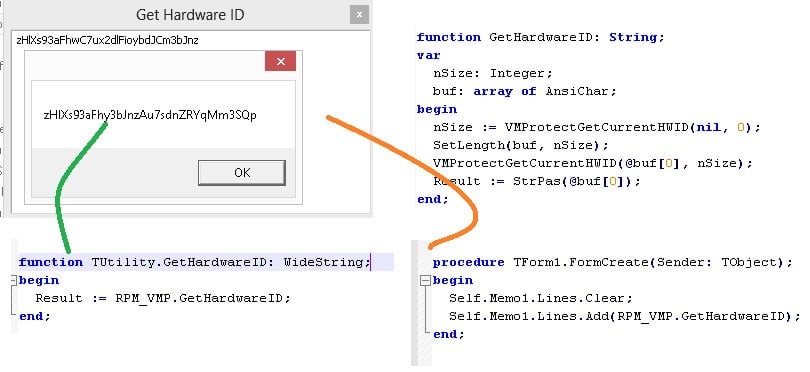
VMProtect provides API to obtain a base64-encoded Hardware ID which contains information about CPU, HDD, Host and Ethernet.

vmprotect-hardware-id
With different versions of VMProtect, you might get different Hardware IDs which refer to the same machine.
both HWIDs are valid and refer to the same machine.
zHlXs93aFhwC7ux2dlFioybdJCm3bJnz
CPU   B35779CC
Host   1C16DADC
Ethernet   76ECEE00
Ethernet   A3625174
Ethernet   2924DD24
HDD   F3996CB4
zHlXs93aFhy3bJnzAu7sdnZRYqMm3SQp
CPU   B35779CC
Host   1C16DADC
HDD   F3996CB4
Ethernet   76ECEE00
Ethernet   A3625174
Ethernet   2924DD24
Decoding the string using base64 will return array of DWORDs (4 bytes). Two right bits of each DWORD is the type of device:
00 - CPU
01 - Host
10 - Ethernet
11 - HDD
To further illustrate the decoding, we can use VBScript for such purpose:
Option Explicit

Dim HWID1, HWID2

HWID1 = "zHlXs93aFhwC7ux2dlFioybdJCm3bJnz"
HWID2 = "zHlXs93aFhy3bJnzAu7sdnZRYqMm3SQp"

Function DecodeHWID(HWID)
	Dim s, sz, r, i, t1, t2, t3, t4, t5, t6
	s = Base64Decode(HWID)
	sz = Len(s)
	If ((sz = 0) Or (sz Mod 4 <> 0)) Then
		DecodeHWID = ""
	Else
		r = ""
		For i = 1 To sz Step 4
			' t1 t2 t3 t4
			t1 = Asc(Mid(s, i + 0, 1))
			t2 = Asc(Mid(s, i + 1, 1))
			t3 = Asc(Mid(s, i + 2, 1))
			t4 = Asc(Mid(s, i + 3, 1))
			t5 = t1 And 3
			Select Case t5
				Case 0: r = r & "CPU="
				Case 1: r = r & "Host="
				Case 2: r = r & "Ethernet="
				Case 3: r = r & "HDD="
			End Select
			t6 = MyHex((t4 * (2^24) + t3 * (2^16) + t2 * (2^8) + (t1 And 252)))
			r = r & t6 & Chr(13) & Chr(10)
		Next
		DecodeHWID = r
	End If
End Function
Please note that the 252 = 0xFC which is used to strip out (clear) the rightmost 2 bits that define the type of device. The Base64decode function is not included here by is a general base64 decode utility function. The MyHex is written as follows to prevent the integer overflow because Hex function can only generate a hex number that is maximum 8 characters.
Function MyHex(Number)
	Dim Sign
	Const HexChars = "0123456789ABCDEF"
	Sign = Sgn(Number)
	Number = Fix(Abs(CDbl(number)))
	If Number = 0 Then
		MyHex = "0"
  	Else
  	  	While Number > 0
    		  	MyHex = Mid(HexChars, 1 + (Number - 16 * Fix(Number / 16)), 1) & MyHex
    		  	Number = Fix(Number/16)
  	  	WEnd
	End If
	If Sign = -1 Then MyHex = "-" & MyHex
End Function
API to decode hardware ID
The JSON-decoded information is available in calling API from: https://helloacm.com/decode-hardware-id/
–EOF (The Ultimate Computing & Technology Blog) —
Last Post: How to Set up Email when Your Server Reboots using Crontab and Mail?
Next Post: C++ Function to Get File Version using Win32 API (ANSI and Unicode version)