We are often told that we are minnows and some others are big whales. But we are never told on what basis are we categorized as such. Today, I am going to show you a very very easy way to tell if you are a minnow or a big whale.
All you have to do is the replace YOUR_STEEMIT_ID with your actual STEEMIT ID in the following Image URL:
https://steemitboard.com/@YOUR_STEEMIT_ID/level.png
For example, mine looks like:
https://steemitboard.com/@justyy/level.png


Type in the following SteemIt ID and click “Check” to reveal if you are minnow or big whale:
The following are some known Steemit Accounts from the Wechat Group #CN Community
@abit

@sweetsssj

@tumutanzi

@hannahwu

@yellowbird

@wlcpu

From the results, I think it really depends on the STEEM Power (without the delegated or delegating SP). As a easy comparison, I have added the images in the daily wechat group ranking table:
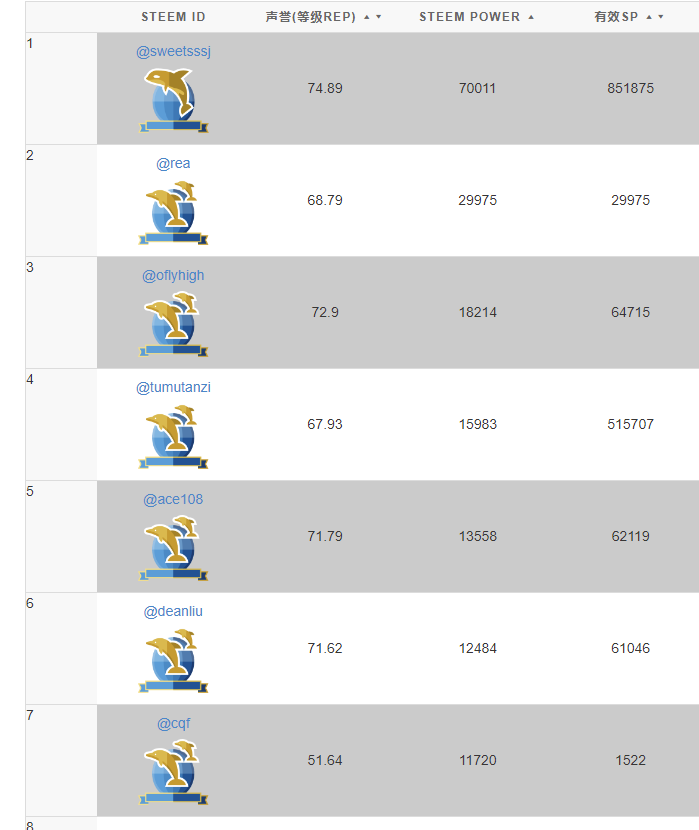
wechat-steemit-whales
Are you motivated now to swim up and become a big whale?
You may also like: STEEMIT: 你到底是大鱼还是小鱼?
–EOF (The Ultimate Computing & Technology Blog) —
Last Post: SteemSQL Tutorial: What is Your Monthly Income on Steemit?
Next Post: Steem API/converter (SBD, STEEM, VESTS)