Windows Batch File (*.bat, *.cmd) is probably the most well-known exectuable file formats because of its simplicity, i.e. each line corresponds to a command for shell to execute. This can be traced back to DOS operating system.
Today, you will probably find some similarities between the Windows *.bat and the BASH shell under Linux. For example, the shift commands in both environments represent shfting parameters one position to the left meaing %1 becomes %2 and %2 becomes %3 and so on. It is still arguable who is copying whom.
I will quickly show you a math example that is working in Windows command batch file. The following script will compute the float value 355/133 with 100 decimal positions. You might refer to [this post] for the  integer division algorithm.
@echo off

::An Example Batch Program to Calculate 355/113.
::OS: 2000, XP, 7 and after
::https://helloacm.com

setlocal

    set /a a=355
    set /a b=113
    set /a c=100

    set /a d=a/b
    set o=%a%/%b%=%d%.

:work
    set /a a=(a-d*b)*10
    if "%a%"=="0" goto clean_up
    set /a d=a/b
    set /a c=c-1
    if "%c%"=="0" goto clean_up
    set o=%o%%d%

    goto work

:clean_up
    echo %o%

endlocal
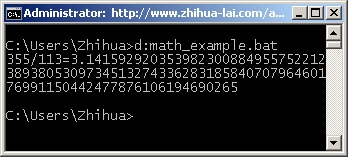
The most important keyword is set /a which will perform the basic arithmetic operations other than simple string assignment. The above will show the following.
–EOF (The Ultimate Computing & Technology Blog) —
322 wordsLast Post: Multiplication Operator in Python
Next Post: A Simple Batch Script to Avoid Auto-run Virus/Trojans by Creating Directories
could u show me the code for a batch file for this?
a-b=c
a*11%=d
(a-b-d)*20%=e
a-d-e=f
Interesting stuff, but using JS to try and prevent copying of the sample code is just lame.
If you want to teach people, show the code, walk the math, and give them samples to copy/paste and try breaking on their own.
You are right. I’ve disabled that. Enjoy the code.