AI Coding Agents Are Reshaping the Barrier to Programming
Coding Is Becoming as Easy as Using a Calculator
From Writing Code to Directing AI: The New Role of Programmers
My 12-Year-Old Used Copilot to Modify Tetris — Programming Has Changed
AI Is No Longer Just Autocompleting Code — It Is Reshaping Software Development
The Future Programmer May Not Start by Writing Code
When Copilot Can Take an Issue, What Is Left for Programmers?
AI Makes Coding Easier — But Makes Being a Programmer HarderAI Coding Agents are reshaping the way software is built. With VS Code Agent, GitHub Copilot, Codespaces, and GitHub Actions, development is shifting from manually writing every line of code to defining problems, guiding AI, and reviewing results. When a 12-year-old can open a project in the browser, use Copilot to modify Tetris, and trigger a deployment workflow, it is clear that the barrier to programming has been dramatically lowered. The future of programming is not just about writing code, but about asking better questions, judging AI-generated solutions, and safely turning ideas into working systems.
AI Coding Agents Are Reshaping the Barrier to Programming
Since the major updates around last November, AI Coding Agents have brought a qualitative change to the software development industry.
In the past, code written by AI might only be half usable. In many cases, developers still had to fix it repeatedly, debug it manually, or even reject the solution entirely because the AI’s approach was wrong. But things are different now. The usability of AI-generated code has improved dramatically, and in many scenarios it is now close to being bug-free.
I only started properly using VS Code Agent mode and GitHub Copilot in February this year. Before that, my workflow was quite primitive: I would throw a problem into ChatGPT or Copilot, let the AI generate some code, then copy that code into VS Code and run it. If there was an error, I would paste the error message back into ChatGPT and ask it to fix the issue.
In other words, I was more like an assistant to the AI — a “human courier” responsible for copying, pasting, running code, and feeding error messages back. It did improve efficiency, but the whole process was still fairly clumsy.
After I started using VS Code Agent, the experience became completely different.
I no longer need to leave the VS Code window. The code, terminal, error messages, and project context are all in the same environment. I can simply prompt the AI directly, tell it what I want to do or where the problem is, and it can read the code, locate the issue, modify the code, and even help run tests.
This is very close to how I work day to day now: constantly talking to AI, constantly prompting AI, and letting it help me analyze problems, locate issues, and modify code.
It is not just about writing code either. Whether it is sending a Teams message, writing an email, or polishing some text, AI can help with that too.
In VS Code Agent mode, or Copilot CLI mode, AI can even read the content and comments of a pull request directly. You can ask it to understand a PR, modify the code based on reviewer comments, or even reply to comments on the PR.
In a sense, programmers today no longer have to write every line of code themselves.
You can create an issue — Azure DevOps supports similar workflows too — and assign it to Copilot. Copilot can start writing code based on the issue, make changes, and create a PR (Pull Request). You can also @ Copilot anywhere in a PR and ask it to continue making changes.
The role of programmers is shifting from “writing code” to “defining problems, reviewing solutions, understanding code, and validating results.”
Writing code itself is no longer the core barrier. But the ability to read code, judge code quality, test properly, and understand system design is becoming even more important.
The unlimited access to Claude Code Opus 4.7 is extremely useful. It can interact with you directly inside VS Code, help debug problems, run code, and even run tests. To be honest, without AI, I now feel like I almost do not know how to code anymore. AI has seriously made me dumber. [laughs]
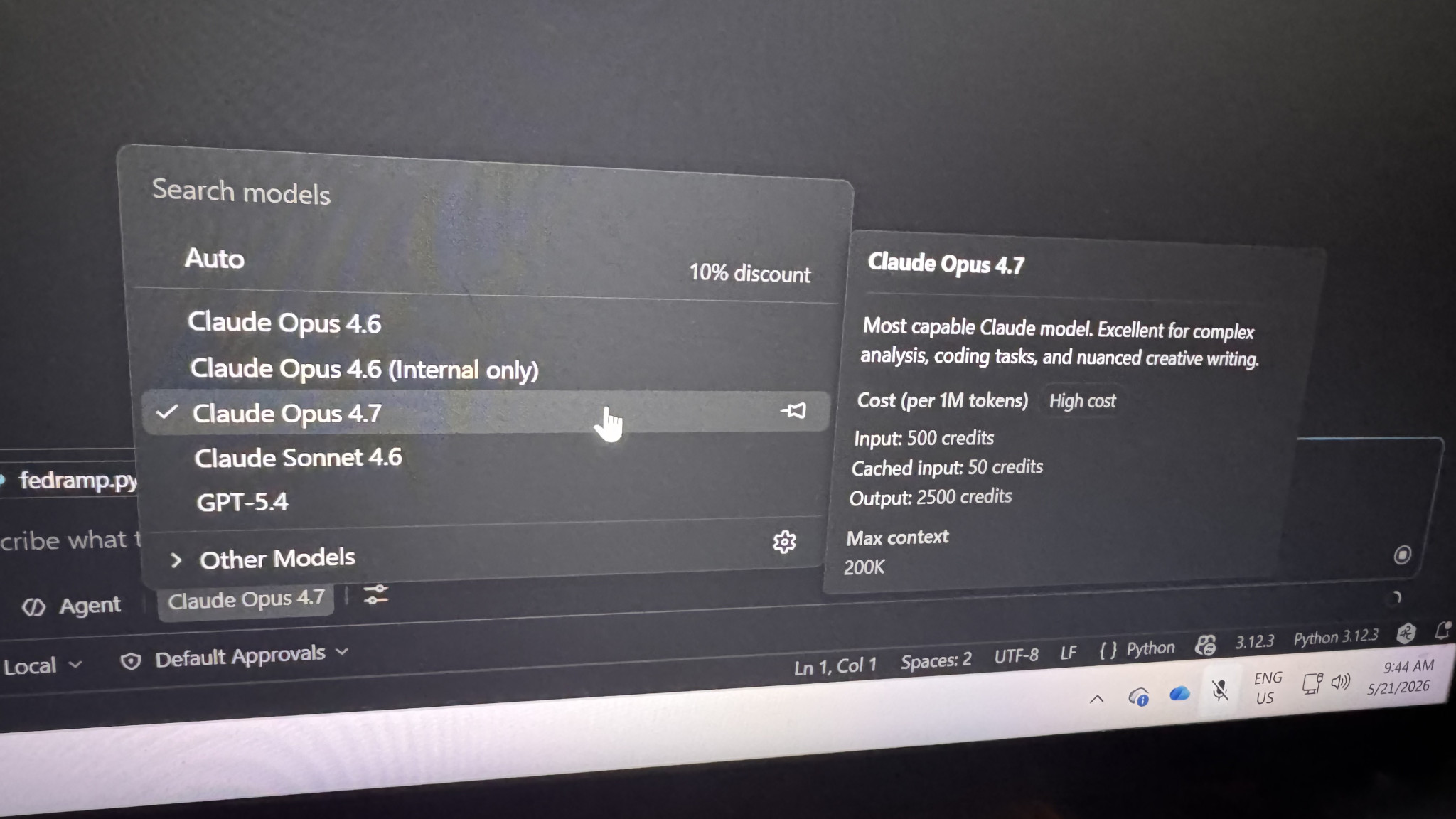
Rely more and more on AI: Claude Opus 4.7
When kids use AI to write games: programming is transforming from a skill into a tool
A 12-year-old modified and released Tetris in one go using GitHub Copilot.
When 12-year-olds start using AI agents to write games, the barrier to entry for programming has truly changed.
My kid modified Tetris using GitHub Copilot: from code to release, all in one go.
A 12-year-old self-taught Git + Codespaces + Copilot and completed a Tetris release.
Writing code in the future may be as simple as using a calculator today.
A 12-year-old has already started modifying games using the Copilot Agent.
My kid modified Tetris in GitHub Codespaces and released it effortlessly.
Kids these days write code: open a browser, summon Copilot, and release.
After seeing my kid use Copilot to write Tetris, I feel the programming era has truly changed.
Git, Codespaces, Agent, automated release—a 12-year-old mastered the entire process.
In the AI era, the barrier to entry for writing code is becoming “being able to make requests.”
Future programming education may no longer start with syntax.
When kids use AI to write games: programming is transforming from a skill into a tool.
Can you write code or not? It’s not important anymore? The ability to command AI is what truly matters.
From Tetris to automated publishing: Children are experiencing the next generation of programming.
Recently, my child also experienced this new way of development.
He opened a project in GitHub Codespaces, used Copilot Agent to vibe coded a Tetris project (see Here), and then triggered the deployment workflow. The whole process, from changing the code to publishing it, was almost seamless.
If this had happened ten years ago, the barrier would have been very high.
First, you would need to know how to configure a development environment. You would need to install Git, clone the repository, understand how to run the project, and know a bit about frontend development, build systems, and deployment. When errors occurred, you would have to Google them, read Stack Overflow, and keep trying different fixes.
Just configuring the development environment alone was enough to discourage many beginners.
But now things are completely different.
Open GitHub Codespaces in a browser, and the development environment is already there.
If you do not know how to write the code, Copilot can generate it for you.
If you do not understand the code, Copilot can explain it.
If you do not know where to make the change, the Agent can help locate it.
After the change is made, GitHub Actions or other automation workflows can trigger the deployment.
This is no longer just “AI helping you autocomplete code.” The entire software development workflow is being reshaped.
In the past, the barriers to programming were environment setup, syntax, toolchains, debugging, and deployment.
In the future, programming may become more like using a calculator: the tool itself will become increasingly powerful, and what truly matters is whether you know what problem you are trying to solve and whether you can judge if the result is correct.
For programmers, this is both an opportunity and a challenge.
Programmers who do not know how to use AI will quickly fall behind in productivity.
Programmers who only rely on AI but cannot understand code will also be in a dangerous position.
The truly valuable skills in the future will no longer be just “I can write code”, but:
- Can I define the problem clearly?
- Can I break down the task?
- Can I judge whether the AI’s solution is reliable?
- Can I safely integrate the code into a real system?
AI has not made programming disappear. But it is lowering the entry barrier to programming like never before.
Perhaps this is how the next generation of children will learn programming: not by starting with environment setup, but by starting with asking questions.
AI/Prompt Engineering
- Teaching Kids Programming vLog: Harness Engineering — Commanding AI to Get Work Done
- AI Coding Agents are Reshaping the Barrier to Programming
- Prompt Engineering: Sharing a Prompt for Preparing Your Exams
- ChatGPT: New Image Creation (art school)
Prompts
- ChatGPT Image 2.0: Casual Selfie of Me
- A few ghibli images that chatgpt creates recently (2026-03-19) | blurt
- AI Transforms Photos into Ghibli Style: ChatGPT 4.0 Costs Money, but Here’s a Free Method
Post: I now Rely more and more on AI: Claude Opus 4.7
–EOF (The Ultimate Computing & Technology Blog) —
1775 wordsLast Post: Teaching Kids Programming - Verify Preorder Sequence in Binary Search Tree (Monotonous Stack)
Next Post: Teaching Kids Programming vLog: Harness Engineering — Commanding AI to Get Work Done