WordPress provides add_action to do something when event occurs. The following shows you a quick/easy example that menus are added to top-bar administration page when event wp_before_admin_bar_render is triggered.
To add a menu you can use $wp_admin_bar‘s method add_menu:
https://codex.wordpress.org/Class_Reference/WP_Admin_Bar/add_menu
The $wp_admin_bar is the global object and the parameter (menu node) passed to add_menu takes a few parameter (an array), e.g.:
    $menu = array(
      'id' => 'helloacm_add_top_admin_bar_google_webmaster',
      'title' => 'Google Webmaster',
      'href' => 'http://google.com/webmaster',
      'parent' => 'helloacm_add_top_admin_bar_links',
      'meta' => array(
        'target' => '_blank'
      )
So the code should like this:
function menu() {
   $menu = array(
      // menu parameters
      'id' => "id",
      'parent' => "parent",
      'href' => "href"
      'title' => "title"
    );
   global $wp_admin_bar;
   $wp_admin_bar->add_menu(
     $menu
   );
)

add_action('wp_before_admin_bar_render', 'menu');
Sub-menus are possible if you specify the parent value.
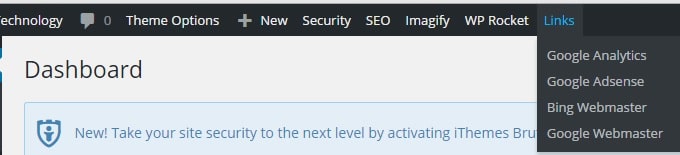
wordpress-add-top-menu
The full source code is at github you can add the code to the functions.php or create a plugin like this.
–EOF (The Ultimate Computing & Technology Blog) —
332 wordsLast Post: WordPress Plugin Tutorial - How to Write First Plugin?
Next Post: PHP Script to Secure the WordPress Folders by Setting Correct File Permissions