Windows Batch File (*.bat, *.cmd) is probably the most well-known exectuable file formats because of its simplicity, i.e. each line corresponds to a command for shell to execute. This can be traced back to DOS operating system.
Today, you will probably find some similarities between the Windows *.bat and the BASH shell under Linux. For example, the shift commands in both environments represent shfting parameters one position to the left meaing %1 becomes %2 and %2 becomes %3 and so on. It is still arguable who is copying whom.
I will quickly show you a math example that is working in Windows command batch file. The following script will compute the float value 355/133 with 100 decimal positions. You might refer to [this post] for the 

@echo off

::An Example Batch Program to Calculate 355/113.
::OS: 2000, XP, 7 and after
::https://helloacm.com

setlocal

    set /a a=355
    set /a b=113
    set /a c=100

    set /a d=a/b
    set o=%a%/%b%=%d%.

:work
    set /a a=(a-d*b)*10
    if "%a%"=="0" goto clean_up
    set /a d=a/b
    set /a c=c-1
    if "%c%"=="0" goto clean_up
    set o=%o%%d%

    goto work

:clean_up
    echo %o%

endlocal
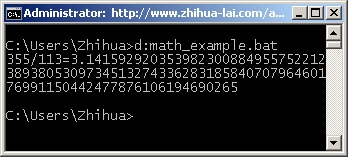
The most important keyword is set /a which will perform the basic arithmetic operations other than simple string assignment. The above will show the following.

–EOF (The Ultimate Computing & Technology Blog) —
Last Post: Multiplication Operator in Python
Next Post: A Simple Batch Script to Avoid Auto-run Virus/Trojans by Creating Directories