Introduction to Logo Turtle
LogoTurtle is currently the FIRST and only one Chrome Extension for Turtle Graphics. I have also written a PHP version of Logo Interpreter in 2006 but that runs only on the server.
Previous Contributions
- v0.0.11: Turtle Programming: While Loop, Do/Else Loop and Unit Tests Added
- v0.0.10: Turtle Programming: Fractal Stars, Random, Console, Eraser, SetPC, SetXY, Examples, Wait, Bug Fixes and So much more!
- v0.0.9: Turtle Programming v0.0.9: Add SetX, SetY, Square and Rect!
- v0.0.8: Turtle Programming v0.0.8: /* */ comments, dotxy, and javascript!
- v0.0.7: Turtle Programming v0.0.7: Functions with Parameters + Recursion!
- v0.0.6: Turtle Programming v0.0.6: Adding Circle, MoveTo, Turn and Screen!
- v0.0.5: Turtle Programming v0.0.5: Adding IF/ELSE and STOP!
- v0.0.4: LogoTurtle: Make Variables and Comments
- v0.0.3: Turtle Graphics Programming Update: Adding text, jump, dot, fontsize, download as png
- v0.0.2: LogoTurtle v0.0.2: ShowTurtle, HideTurtle, Color, Width and Help.
- v0.0.1: Teach Your Kids Programming – The First Logo Interpreter (Turtle Graphics) in Chrome Extension!
LogoTurtle v0.0.12 New Features
This Commit has the following changes:
- Add Powerful For Loop
- Add INC to increment a variable
- Add DEC to decrement a variable
- StackOverFlow Max Depth set to 1024
- Add Aliases: SetColor = SetPC (Set Pen Color), SetH = Turn (Set Turtle Angle)
- Add Clear to clear all functions and variables in current workspace.
- Export class LogoParser and LogoCanvas to NPM: https://www.npmjs.com/package/logoturtle
LogoTurtle Screenshots
For in LOGO can be used in a few ways:
FOR [START STOP] [CODE]
FOR [START STOP STEP] [CODE]
FOR [VARIABLE START STOP] [CODE]
FOR [VARIABLE START STOP STEP] [CODE]
For example,
ht cs for [i 0 360 45] [seth :i make "n 0
  repeat 80 [setpc :random*15
    repeat 8 [fd :n rt 45] inc :n
  ]
]
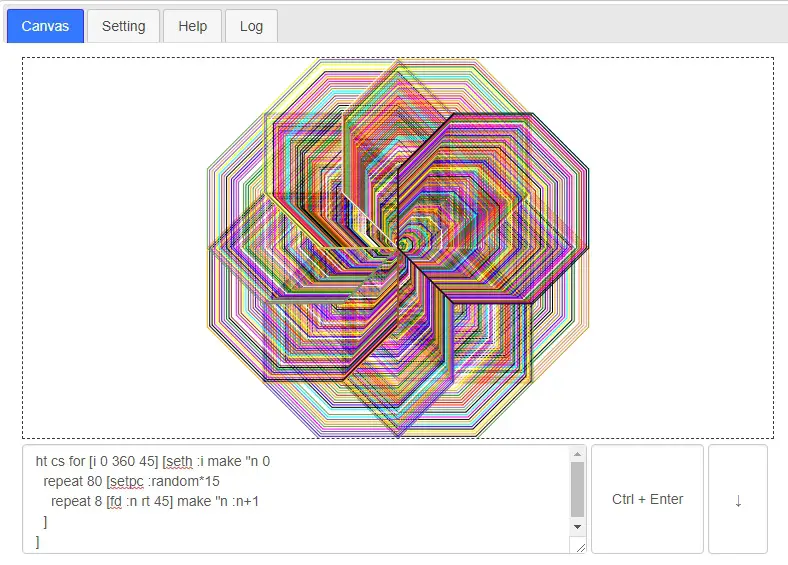
The For Loop in LOGO
Implement the FOR Loop in Javascript for LOGO
case "for":
	if (word_next != '[') {
		this.pushErr(word, LOGO_ERR_MISSING_LEFT, word_next);
	}
	find_next_body = getNextBody(s, i, U);
	if (find_next_body.right >= U) {
		this.pushErr(word, LOGO_ERR_MISSING_RIGHT);
		return false;
	}
	let for_code = s.substring(find_next_body.left + 1, find_next_body.right).trim();
	i = find_next_body.right + 1;
	let for_body = getNextBody(s, i, U);
	if (for_body.right >= U) {
		this.pushErr(word, LOGO_ERR_MISSING_RIGHT);
		return false;
	}
	let for_code2 = s.substring(for_body.left + 1, for_body.right).trim();
	if ((for_code.length > 0) && (for_code2.length > 0)) {
		// remove surrounding white spaces
		let for_code_arr = for_code.split(' ').map(item => item.trim()).filter(x => x != '');
		// For Syntax: [VarName Start Stop Step]
		let for_index = 0;
		let for_var = "";
		let saved_for_var = null;
		if (isValidVarName(for_code_arr[0])) {
			for_var = for_code_arr[0];
			if (for_var in this.vars) {
				saved_for_var = this.vars[for_var];
			}
			this.vars[for_var] = 0;
			for_index ++;
		}
		if (for_code_arr.length - for_index < 2) {
			this.pushErr(word, LOGO_ERR_INVALID_FOR);
			return false;
		}
		if (for_code_arr.length - for_index > 3) {
			this.pushErr(word, LOGO_ERR_INVALID_FOR);
			return false;
		}
		let for_start = this.evalVars(for_code_arr[for_index]);
		let for_stop = this.evalVars(for_code_arr[for_index + 1]);
		let for_step = 1;
		if (for_index + 2 < for_code_arr.length) {
			for_step = this.evalVars(for_code_arr[for_index + 2]);
		}
		if ((for_start === '') || (!isNumeric(for_start))) {
			this.pushErr(word, LOGO_ERR_MISSING_NUMBERS, for_start);
			return false;
		}
		if ((for_stop === '') || (!isNumeric(for_stop))) {
			this.pushErr(word, LOGO_ERR_MISSING_NUMBERS, for_stop);
			return false;
		}
		if ((for_step === '') || (!isNumeric(for_step))) {
			this.pushErr(word, LOGO_ERR_MISSING_NUMBERS, for_step);
			return false;
		}
		// get for values
		for_start = parseInt(for_start);
		for_stop = parseInt(for_stop);
		for_step = parseInt(for_step);
		// beware of endless loop ^_^
		for (let for_loop = for_start; for_loop <= for_stop; for_loop += for_step) {
			if (for_var != "") {
				this.vars[for_var] = for_loop;
			}
			// if body
			if (!this.run(for_code2, 0, for_code2.length, depth + 1)) {
				return false;
			}
		}
		// restore loop variable
		if ((for_var != "") && saved_for_var !== null) {
			this.vars[for_var] = saved_for_var;
		}
	}
	// parse next token
	i = for_body.right + 1;
	break;
Roadmap of Chrome Extension: Logo Turtle
I believe LogoTurtle is more or less in beta now. Therefore, bug Fixes and any suggestions, please shout @justyy
Technology Stack
If an App can be written in Javascript, eventually it will be written in Javascript.
Chrome Webstore
Install the Turtle Programming for Kids Now!
Contribution Welcome
Github: https://github.com/DoctorLai/LogoTurtle
- Fork it!
- Create your feature branch: git checkout -b my-new-feature
- Commit your changes: git commit -am ‘Add some feature’
- Push to the branch: git push origin my-new-feature
- Submit a pull request.
–EOF (The Ultimate Computing & Technology Blog) —
Last Post: Improve Performance using Asynchronous Design (SteemIt)
Next Post: CoinTools Update: Adding News Feed, Average Series in Historical Graphs