Dotfuscator is a commercial software that is used to obfuscating .NET source code. It could be found in early Visual Studio (as a default obfuscator) but later it became an independent software company.
The Jenkens server is a continuous integration open source project (written in Java). When I manually run the dotfuscator on the server, it shows license is registered and OK. but when the Build Server (Jenkins) invokes the dotfuscator on the same server, it shows unregistered.
the reason of getting this error message is because you registered the application with one user (Administrator) and are running the jenkins build as a different user. You can resolve this issue two different ways:
1. Log in as the user running the jenkins build on that machine and launch Dotfuscator and accept the user agreement
2. Take the following files and move them to the same location under the user running the jenkins build:
C:\Users\{user that installed dotfuscator}\AppData\Local\PreEmptive Solutions\Dotfuscator Professional Edition\4.0\dfusrprf.xml
C:\Users\{user that installed dotfuscator}\AppData\Local\PreEmptive Solutions\Dotfuscator Professional Edition\4.0\dotfuscator.cfg
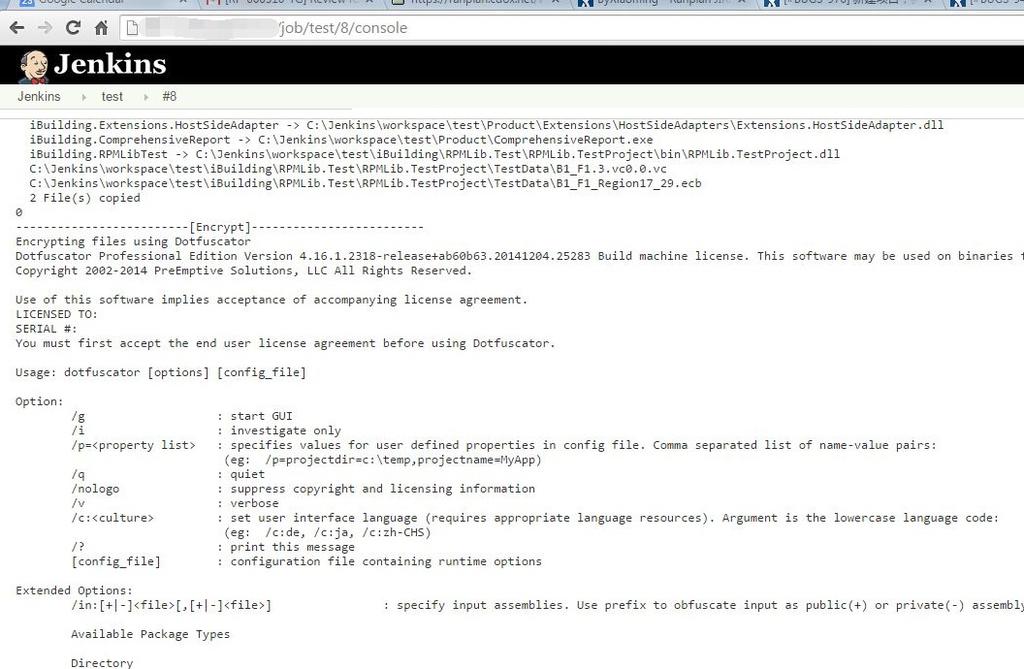
dotfuscator-on-jenkins
–EOF (The Ultimate Computing & Technology Blog) —
268 wordsLast Post: How to Convert GB2312 (or other Non-ANSI Characters) to UTF-8 encoding (Both MySQL and Files Charset)
Next Post: Disable WordPress Maintenance Mode when Upgrading Plugins Stuck