Teaching Kids Programming: Videos on Data Structures and Algorithms
Flashing Lights/Screen on Microbit
The idea is to go through all 25 pixels and randomly turn them on or off (status) and the brightness can be set as well.
def on_forever():
    for row in range(5):
        for col in range(5):
            status = randint(0, 1)
            if status:
                led.plot(row, col)
            else:
                led.unplot(row, col)
            led.set_brightness(randint(0, 255))

basic.forever(on_forever)
The Microbit provides the visualisation of the code in blocks:
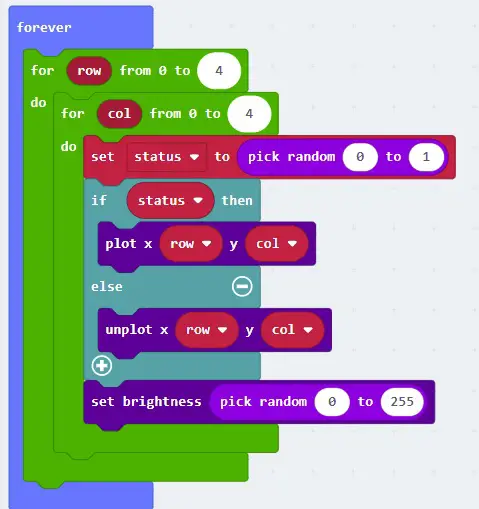
microbit-flashing-lights-code-block
Another way is to convert number 0 to 25 to row and column.
def on_forever():
    for i in range(25):
        row = i // 5
        col = i % 5
        status = randint(0, 1)
        if status:
            led.plot(row, col)
        else:
            led.unplot(row, col)
        led.set_brightness(randint(0, 255))

basic.forever(on_forever)
The result is the following Microbit Simulator showing a flash light!
–EOF (The Ultimate Computing & Technology Blog) —
306 wordsLast Post: Teaching Kids Programming - How to Draw a Spiral Shape using Python and Turtle Graphics?
Next Post: Teaching Kids Programming - Is Subsequence Algorithm via Recursion (Greedy)