CrystalDiskInfo is a well-known (Japanese) software that shows information/stats and monitor the health of your Hard drives. So you know when to replace the Hard Drives if it shows some abnormal stats by CrystalDiskInfo software.
CrystalDiskInfo is a free, open-source software utility developed by Crystal Dew World for Microsoft Windows that allows users to view information about their hard drives, including the drive’s model number, serial number, firmware version, and temperature. The application can also provide health and performance status of your hard drive. This includes various S.M.A.R.T parameters such as read error rate, spin-up time, etc., as well as an overall health rating. CrystalDiskInfo also offers support for many other disk types such as SSDs and USB flash drives. It includes a few advanced features such as an information viewer for each drive with detailed information about the drive’s specifications and a built-in benchmarking tool to check the drive’s performance.
For Some Modern SSDs (Solid State Drives), CrystalDiskInfo shows the percentage of usage, so you can estimate the life-span of your SSD drives. HDDs are hard to predict as there might be mechanical failures.
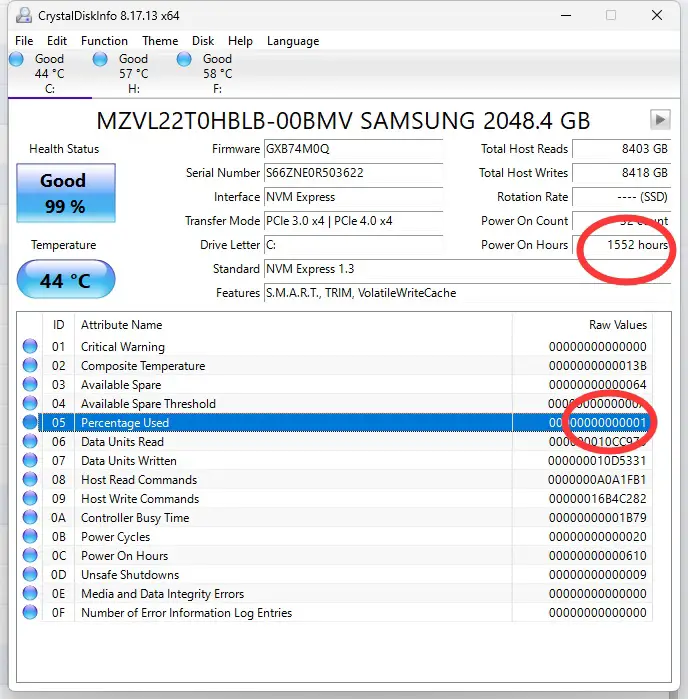
CrystalDiskInfo Software Shows Percentage of Usage *(Lifespan) of SSD
With the above, it is estimated that my SAMSUNG 2048.4 GB SSD/NVme (comes with Microsoft Laptop Studio Pro) has around total 150,000 hours of usage, about 17 years life span/expectancy, Wow!
The Crystal DiskInfo Software shows rapid decreasing lifespan after another 3000 hours of usage (less than 6 months), so I think there is a problem either with this SSD brand/make or it is just this particular SSD failure (low quality).
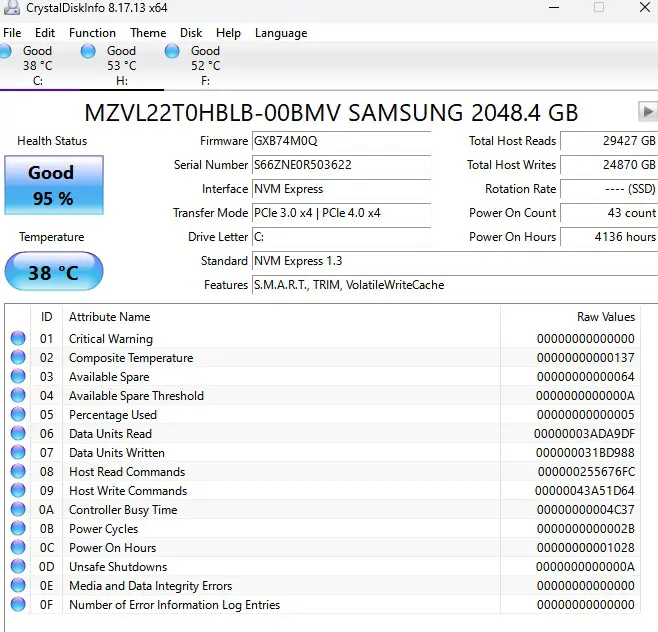
Crystaldiskinfo shows rapid decreasing lifespan of SSD after another 4000 hours of usage
I have performed the same check on another same laptop (Microsoft Surface Studio), the C drive is NVMe Express 1.4 (SSD, Solid State Drive), and it shows normal lifespan decreasing rate, still 100% healthy after 1148 hours of usage. However, my wife is using it to only watch youtube and other lightweight tasks, she is not playing games, and nothing heavy weight. I bought her this laptop roughly a year before I got one for myself.
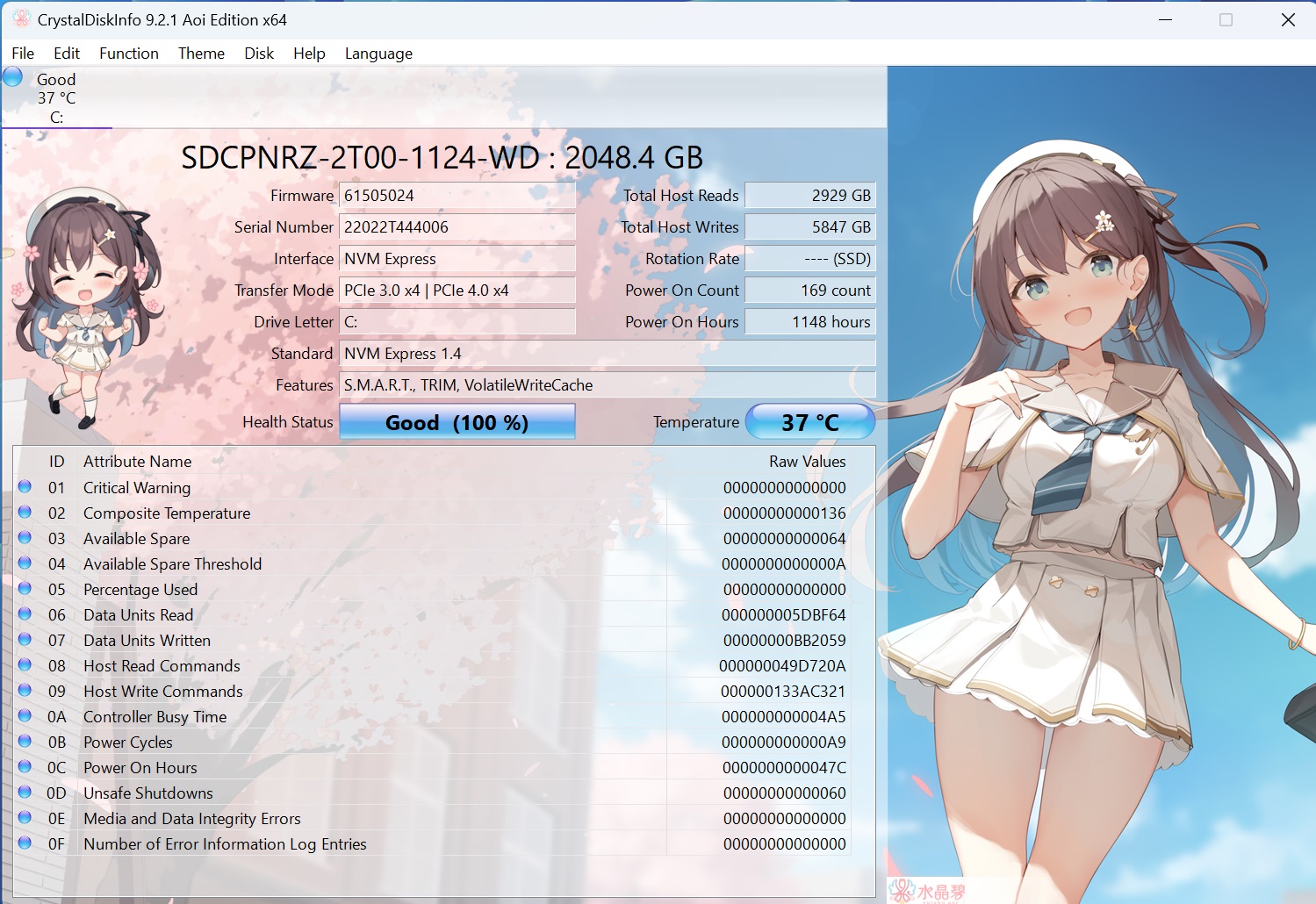
Normal Lifespan of SSD on another same laptop (Microsoft Surface Studio)
SSD usage frequency/lifespan
According to CrystalDiskInfo, the current usage statistics for the hard drive are as follows:
- Power-on hours: 10,032 hours
- Total data read: 91,230 GB
- Total data written: 74,433 GB
- Power cycles: 85 times
- Current health status: 87%
Based on the average usage rate so far, the estimated remaining lifespan of the drive is:
(10,032÷13×87)÷24÷365≈7.66years
Including the 1.14 years already used, the total estimated lifespan is approximately 8.8 years.
Projected remaining capacity based on the remaining lifespan:
- Estimated remaining read volume: 91,230 ÷ 13 × 87 ≈ 610,539 GB
- Estimated remaining write volume: 74,433 ÷ 13 × 87 ≈ 498,218 GB
It is worth noting that for hard drives—especially SSDs—write operations are generally more complex and wear-intensive than read operations, making write volume a key indicator of drive health.
Additionally, temperature is another critical factor affecting drive longevity. If the drive operates in high-temperature conditions for extended periods, it may age faster and have a significantly reduced lifespan.
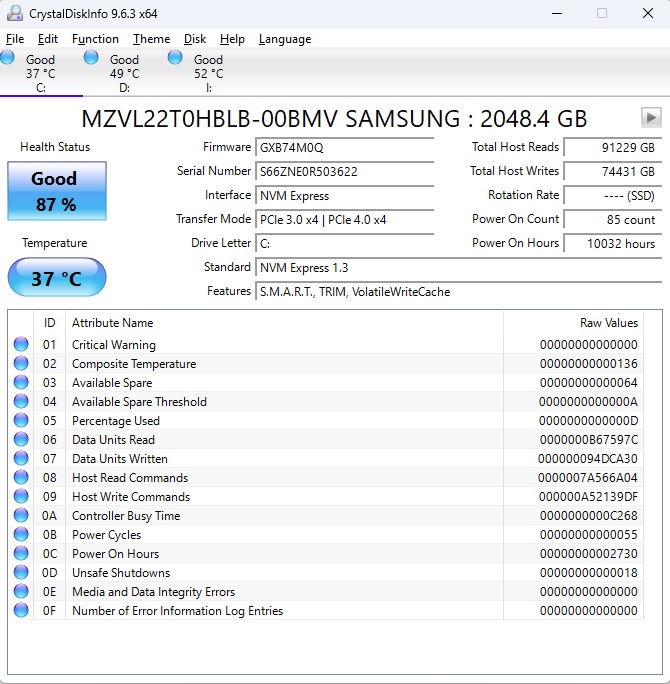
CrystalDiskInfo Software Reports: Samsung 2TB SSD LifeSpan is 87% Remaining
A comment:
But it means that you read only 77TB so whole disk 35 times. I think not much, but more important is writing, as ssd disk is similar to sdcards. So you wrote whole disk 25 times. I think it should be about 100.
Related Posts on SSD Lifespan
–EOF (The Ultimate Computing & Technology Blog) —
946 wordsLast Post: Teaching Kids Programming - Algorithms to Count Houses in a Circular Street
Next Post: Blockchain and Web3.0 Interview Questions